Pages

Showing posts with label Webpage background color. Show all posts

How to Choosing foreground and background colors


Photoshop uses the foreground color to paint, fill, and stroke selections and the background color to make gradient fills and fill in the erased areas of an image. The foreground and background colors are also used by some special effects filters.
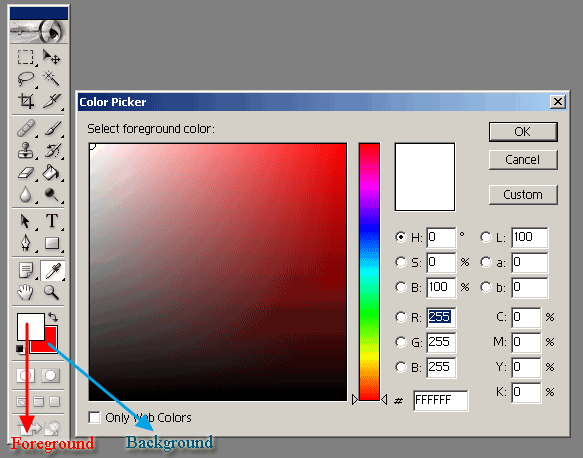


You can designate a new foreground or background color using the eyedropper tool, the Color palette, the Swatches palette, or the Adobe Color Picker.  

The default foreground color is black, and the default background color is white. (In an alpha channel, the default foreground is white, and the background is black.)


About color modes and models in Photoshop

A color mode determines the color model used to display and print images. Photoshop bases its color modes on established models for describing and reproducing color. Common models include HSB (hue, saturation, brightness); RGB (red, green, blue); CMYK (cyan, magenta, yellow, black); and CIE L*a*b*. Photoshop also includes modes for specialized color output such as Indexed Color and Duotone. ImageReady uses RGB mode to work with images.

In addition to determining the number of colors that can be displayed in an image, color modes affect the number of channels and the file size of an image.

 You can set up the Info palette so that you can select any tool, position the pointer over any part of an image, and determine the color value under the pointer. You can customize the Info palette and color samplers to express color values using HSB, RGB, CMYK, Lab, or Grayscale modes without changing the mode of the image itself.and the procedure to change Info palette options in Using the Info palette (Photoshop).

How To Pick Color For Web Using Photoshop


It is a very easy way to pick color and getting color code from adobe Photoshop or adobe Photoshop cs. Get only two stapes to pick color for your webpage. That is-


 Step 1: Open your Photoshop and click on color box in toolbar.


 Step 2: Now open color box, here you click in (Only web colors) check box and choice your color. On the right side make a color code. Now you copy the color code and use it your webpage.
